Agents
Configure the coding agents and harnesses Proliferate can run.
Proliferate supports many harnesses and models with their native functionality.
Supported agents
| Harness | Typical use |
|---|---|
| Claude Code | Anthropic's Claude coding agent. Learn more in the Claude Code docs. |
| Codex | OpenAI-created coding agent. |
| Gemini CLI | Google-created coding agent. |
| OpenCode | Provider-flexible open coding workflows. |
| Cursor CLI | Workflows and automations run via the Cursor command line interface, supporting both local and cloud runtimes. |
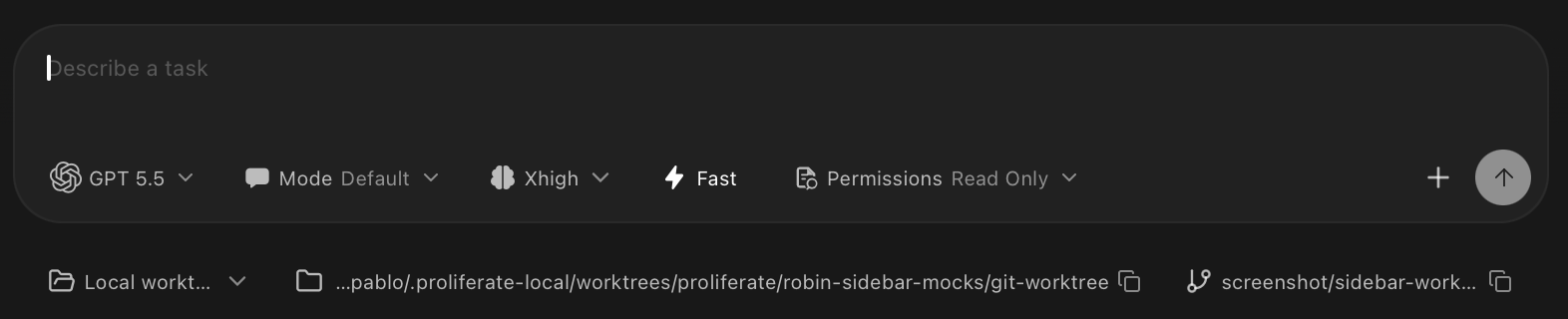
Proliferate supports each agent's native configuration options (thinking mode, fast mode, etc.)
Configuration options
Proliferate exposes each harness's native controls in one workspace UI. The exact controls vary by agent, but most runs are shaped by the same decisions:
| Option | What it controls | Use it when |
|---|---|---|
| Planning mode | Whether the agent starts by proposing a plan before changing files. | You want to review direction before implementation begins. |
| Model | Which model the harness should use for the run. | You want to trade off quality, speed, context length, or cost. |
| Reasoning level | How much effort the agent spends thinking through the task. | The task is complex, ambiguous, or requires careful sequencing. |
| Fast mode | Whether the agent should optimize for faster iteration instead of slower, deeper work. | You want quick edits, exploration, or lightweight follow-ups. |
| Approval behavior | Which actions require human approval before the agent continues. | The task may run commands, edit files, use tools, or touch sensitive areas. |
| Tool access | Which local tools, MCP servers, plugins, or connectors the agent can use. | The task needs repository context, external systems, browsers, terminals, or custom tools. |
| Review persona | The perspective used for plan review or code review. | You want a specific reviewer style, such as architecture, product, security, or test coverage. |
You can configure these options directly from the chat input before starting or continuing a run.
Agent defaults
Use agent defaults when you want a repository or organization to start with a specific agent, model, mode, or review setup.
Defaults are starting points. You can still override the agent for an individual workspace, chat, review run, or automation when the task needs a different harness.