Artifacts
Agents can present anything- a file, a React component, a working demo. Proliferate renders it natively.
Artifacts let agents present you with renderable content inline- not just code or text in a transcript.
When an agent produces an artifact in a Cowork thread, Proliferate renders it natively in the Cowork artifact panel. You see what the agent built, in its real form, in the same place you're talking to it.
Supported artifact types
Proliferate renders four kinds of artifacts:
- Markdown- formatted prose with links, lists, and inline code.
- HTML- a complete HTML document, rendered in its own nested frame.
- SVG- vector graphics, sanitized before they render.
- React components- interactive JSX/TSX, compiled at runtime and run in a sandboxed frame with a curated set of libraries.
Each artifact is a single file, tracked by a manifest the agent's artifact tools manage. Anything else (PDFs, images, JSON, other binaries) isn't rendered as an artifact.
Interactive React artifacts
React artifacts are the interesting case. Agents can ship working demos- not screenshots, not pseudo-code- and you can click through them to verify the idea before committing to an implementation.
Each React artifact runs in its own sandboxed frame with React 19 and a fixed set of libraries available by import: Lucide icons, Recharts, D3, date-fns, and lodash, alongside React itself. The agent's imports are checked against that list before the component runs- an import outside the list fails with a clear error instead of silently reaching out to the internet for an arbitrary package.
Every artifact stays in the thread
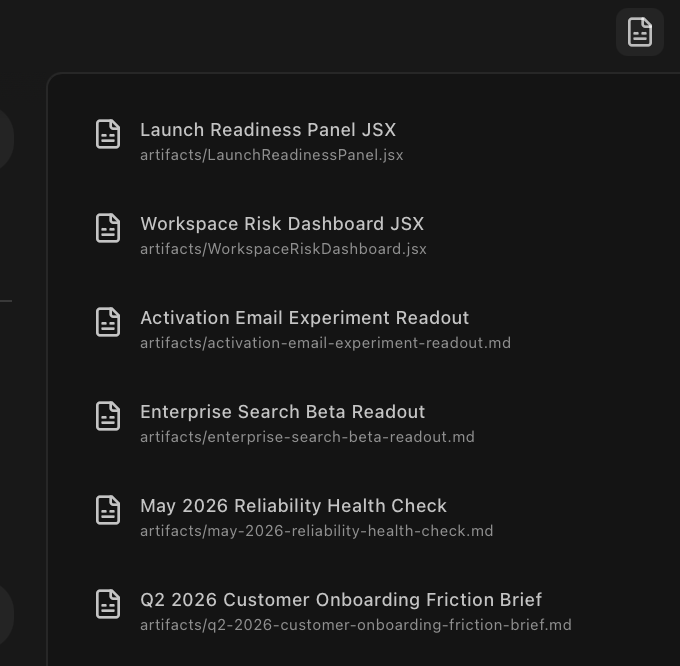
Artifacts belong to the Cowork thread that created them, not to a single turn. Everything the agent has ever built in that thread stays listed in the artifact panel, so you can reopen an earlier one anytime- useful for "show me three approaches," where you ask for each version in turn and flip back between them afterward to decide.
Cowork artifact list
The Cowork artifact panel's list view, showing multiple past artifacts from the same thread with title and file path, before one is opened.
Sandboxing
React and HTML artifacts run inside a sandboxed frame with no network access at all- not even through a permission prompt. The only thing an artifact can do outside its own frame is ask to open a link, which you see and control.
The sandbox is an isolation boundary, not a full security boundary. Treat artifacts the way you'd treat any code an agent produced- if it does something unexpected, read the source before trusting it.
Common uses
- Quick visual demos of a UI change before committing to the full build.
- Diagrams generated from data the agent already pulled.
- Inline previews of generated docs, READMEs, or release notes.
- Comparing two implementation approaches, one after the other.
- Rendering structured data the agent produced (tables, charts).